News
Blue Ridge Consultants Achieves Silver Atlassian Solution Partner Status



This blog’s purpose is to build an example cost comparison when considering migrating from Atlassian Server products to Atlassian Data Center or Atlassian Cloud. We found that while Atlassian’s self-hosted Data Center option was less of a licensing cost as compared to their Cloud service, you may end up paying more all together.
This post will not cover feature comparison of Data Center and Cloud. The example client is entirely fictional but migration costs are based on real-world experience. Atlassian, Partner, and 3rd party app discounts will not be applied to license costs. This post is purely for educational purposes and exists to help the decision-making process. Prices may vary.
Umbrella Corporation has reached out to Blue Ridge Consultants to perform a findings and recommendations engagement regarding their existing Server deployment and whether to purchase a Data Center license or migrate to Cloud. Umbrella currently has a Jira and Confluence instance which both hold Server licenses of 500 users. After receiving the client's system information, Blue Ridge has confirmed the Jira and Confluence instance sizing recommendations are mid-scale instances. Umbrella has Script Runner for Jira, JSU, and Tempo Timesheets as apps installed on Jira and no apps in Confluence. Okta SSO is a requirement for user login. Three employees currently administer the Atlassian tools. One is a full-time engineer, one is a project manager with their time split between multiple projects, and the last is an AWS Infrastructure Engineer.
|
Line Item |
Cost per Year |
|---|---|
|
Atlassian Access |
$17,500 |
|
Jira |
$51,000 |
|
Confluence |
$37,800 |
|
Script Runner for Jira |
$6,000 |
|
JSU |
$2,575 |
|
Tempo |
$9,750 |
|
Total |
$124,625 |
|
Line Item |
Cost per Year |
|---|---|
|
Jira |
$42,000 |
|
Confluence |
$27,000 |
|
Script Runner for Jira |
$2,750 |
|
JSU |
$1,200 |
|
Tempo |
$11,500 |
|
Total |
$84,450 |
Umbrella Corporation hosts their Server instances in AWS. To match Atlassian Cloud performance, let’s assume that a minimum of two nodes per application are required. To handle traffic a single load balancer is also needed. All AWS prices are based on On-Demand pricing and are likely to change in the future.
All hosting costs are built into the above license cost.
|
Line Item |
Cost |
|---|---|
|
N/A |
N/A |
|
Line Item |
Cost per Year |
|---|---|
|
c5.xlarge (load balancer) |
$1,489.20 |
|
4 x c5.4xlarge (App nodes) |
$23,827.20 |
|
Elastic Block Storage 1 TB |
$983.04 |
|
Total |
$26,299.44 |
Migrations costs are based on our past experience with instances of this size. Umbrella will be required to do an initial upgrade to Data Center. General support activity is not included. All employee and migration costs are purely estimates.
|
Line Item |
Cost |
|---|---|
|
Migration to Cloud |
$35,000 |
|
Employee Migration UAT |
$10,000 |
|
Cloud Training |
$7,500 |
|
Total |
$52,500 |
|
Line Item |
Cost per Year |
|---|---|
|
Upgrade to DC |
$12,500 |
|
Employee Upgrade UAT |
$10,000 |
|
Total |
$22,500 |
Employee salary costs are based on the industry average and the assumption that the Umbrella will do two upgrades per year. General support activity is not included.
|
Line Item |
Cost |
|---|---|
|
N/A |
$0 |
|
Total |
$0 |
|
Line Item |
Cost per Year |
|---|---|
|
AWS Infrastructure Engineer |
$15,000 |
|
Atlassian Engineer |
$20,000 |
|
Project Manager |
$10,000 |
|
Employee Upgrade UAT |
$10,000 |
|
Total |
$55,000 |
|
Line Item |
Cost |
|---|---|
|
Licenses |
$124,625 |
|
Hosting per year |
$0 |
|
One Time Costs |
$52,500 |
|
Ongoing Maintenance Costs |
$0 |
|
Total |
$177,125 |
|
Line Item |
Cost |
|---|---|
|
Licenses |
$84,450 |
|
Hosting per year |
$26,299.44 |
|
One Time Costs |
$22,500 |
|
Ongoing Maintenance Costs |
$55,000 |
|
Total |
$188,249.44 |
|
Line Item |
Cost |
|---|---|
|
Y1 |
$177,125 |
|
Y2 |
$124,625 |
|
Y3 |
$124,625 |
|
Y4 |
$124,625 |
|
Y5 |
$124,625 |
|
Total |
$675,625 |
|
Line Item |
Cost |
|---|---|
|
Y1 |
$188,249.44 |
|
Y2 |
$165,749.44 |
|
Y3 |
$165,749.44 |
|
Y4 |
$165,749.44 |
|
Y5 |
$165,749.44 |
|
Total |
$851,247.20 |
Cloud ultimately is the more economical option, despite its higher licensing cost. This is due to ongoing hosting and maintenance costs in Data Center. Compound the cost with Atlassian’s initiative to become a cloud-first company by prioritizing Cloud updates and you have a winning argument for switching platforms. With recent updates to Data Center licensing costs, we will continue to see better value in the cloud moving forward.
Check out a more detailed report done by Forrester here: https://www.atlassian.com/whitepapers/forrester-total-economic-impact-spotlight-cloud-migration
Due to the growing dependence of business operations on the Atlassian suite, the self-hosted Atlassian applications are becoming even more enticing targets for security breaches. A loss of data, a ransomware attack, a service outage, or a data breach could halt your business operations. It is important for all of us who manage self-hosted Atlassian products to stay vigilant of the risks to minimize these threats.
Atlassian publishes security advisories at https://www.atlassian.com/trust/security/advisories
To be notified by email when new advisories are published go to Email and Privacy Preferences and subscribe to Tech Alerts emails. We also recommend signing up for the Atlassian Blog as well (at the top of the above link).
CVE, short for Common Vulnerabilities and Exposures, is a list of publicly disclosed computer security flaws. Many websites track and diagnose CVEs like CVE or CVE Details. These websites can be used to learn how to diagnose and identify critical threats to your systems. Is the threat critical and must be patched right away? Who and what does this affect and what are the signs of a breach? These pieces of information could be important to stopping or identifying a threat.
Blue Ridge uses CVE Details to stay up to date on the latest threats. See an example here:
Atlassian has created Long Term Support releases for most of its applications. The LTS versions contain security-critical patches that could help protect your instances and Atlassian regularly updates these versions with security and bug patches. Try to avoid allowing your application installation versions from falling the current LTS version.
Atlassian will no longer support or patch server products after February 15, 2024. If you are using a Server product, are you prepared to make the jump to Data Center or Cloud? You can learn more about which route to choose from our previous article:
Are you having trouble upgrading to an LTS version or patching an Atlassian product? Are you not sure if Data Center or Cloud is a better choice for you? Do you need help with a migration? Engage our experts here: help@blueridge.cx
Easily see the most recent Jira projects accessed and the work assigned.
The various tabs allow users to quickly cycle through recently worked-on, viewed, assigned, and starred issues. Quickly pick up where you left off without JQL filters or going directly into projects!
The “Your Work” dropdown also allows for quick access to any of these categories without directly having to change pages.
Make your comments and descriptions pop with the new editor in Jira Cloud. Add emojis, code snippets, statuses, and more just like you would on a Confluence page
Hotkeys allow users to quickly insert formatting. Make code and statuses easy to read! No more misformatted code or confusing comments.
As a bonus gifs (pronounced jifs) work as well!
Move, organize, copy, edit, and create pages directly from the page tree. Users will no longer have to go to each page individually to execute actions.
Saves resource time and makes the end-user experience more enjoyable.
Admin Key allows administrative users to gain temporary access to restricted pages. This allows for quick troubleshooting without additional plugins that allow access to other accounts.
Admin Key has an audit log to track who uses it as well. It tracks actions like what page was accessed, whether it was edited, and if any permissions changes occurred.
Invite your guests for external collaboration! Guests are free of charge and cloud instances can have up to five guests per paid user. Blue Ridge likes to use this feature to share reports and documentation with our clients.
To Invite a Guest:
Go to admin.atlassian.com. Select your organization.
Select Directory > Users.
Select Invite users.
Add the email addresses of the guests you want to invite
Open the product role dropdown for Confluence.
Unselect User.
Select Guest.
Select Invite users.
Guest permissions in a space can be manually tweaked.
Caveats:
Guests can only have access to one space at a time.
Guests must be given space access on an individual basis.
Learning the keyboard shortcuts in Confluence can significantly reduce the time required to complete repetitive tasks. Over time shortcuts can save hours over “hunt and click“ methods.
Shortcuts can be viewed in the top right corner of the screen under the
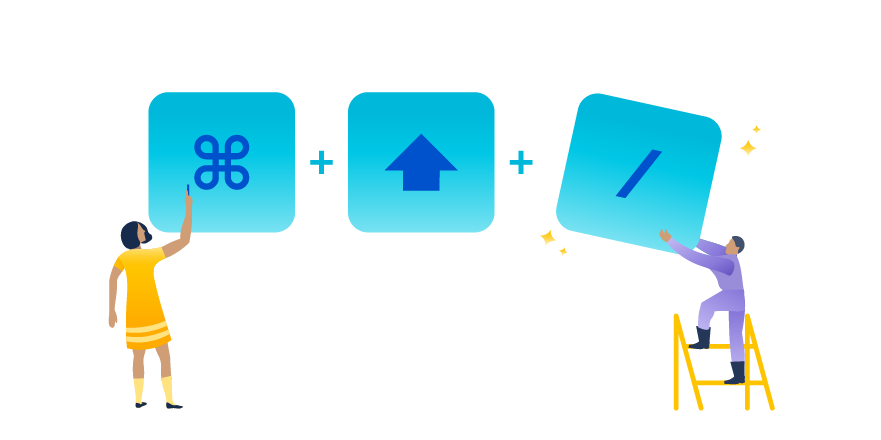
Need to add a macro to a page that is currently being edited? Use { in server or / in the cloud instead of the + macro button.
When viewing a Confluence page, edit in place by typing e on a page.
Access quick search by typing g g. This one is useful for admins wanting to get around the admin menus quickly.
Add a page by typing c.
Comment on a page by typing m.
Watch a page by typing w.
There is no reason to start each new page from scratch. Spend less time formatting and more time documenting. Confluence provides a variety of templates for teams to create nice-looking readable pages.
Additionally, Administrators can build custom templates for users with ease. Templates have many features, like template variables, that allow for ease of use. Administrators can also disable any template and download additional templates from third-party vendors.
https://support.atlassian.com/confluence-cloud/docs/create-a-template/
Not all of us have time to proofread every article, document, blog, and Confluence page to perfection. Grammarly saves us time and energy with an easy way to fix everything from common mistakes to complicated sentence structures. Write accurately and confidently without the time sink.
Grammarly is an external app that can be added as a browser extension or installed directly into the OS. There is a free version for basic grammar and spelling errors.
Instead of spending time bouncing between tools, the Jira and Confluence integration easily allows many actions to be taken directly on Confluence pages. Create, view, and report on Jira issues in Confluence. Additionally, Jira Roadmaps can be added to Confluence pages to track project planning and timelines.
Aggregate and view all your data in place with this simple integration.
Users want to be able to find and consume relevant pages to them quickly. Enabling features like analytics allows space owners to keep content up-to-date and useful. With analytics, insights into page performance can be utilized to archive what isn’t being used and promote the critical pages.
Analytics can also be used on a space level to identify spaces that can be archived. Leave your outdated content behind!
Get the team more involved by making Confluence fun and engaging. An example of this is the app Trophies for Confluence. It allows users to receive points and awards for writing or engaging in content. Sharing expertise is an integral part of any workplace; this app can help motivate employees to engage in the content further.